Authenticate payments with 3D Secure
On September 14, 2019, the Revised Payment Service Directive, also known asPSD2, was implemented in all countries in the European Economic Area (EEA). PSD2 requires most online transactions within the EEA to have customer authentication. To be compliant, Shopify processes credit card transactions in the EEA by using 3D Secure, which is a payment authentication method.
This guide describes the 3D Secure authentication process and how to update your sales channel app so that it supports payment authentication by using 3D Secure. The mutations in this tutorial that complete checkouts are available only for sales channels.
Requirements
Anchor link to section titled "Requirements"- You've completed theGetting started with the Storefront APIguide.
You're familiar withquerying products and collections.
If instead of completing theGetting started, you'veturned your app into a sales channelandrequested and been approved for payment processing.
You've familiarized yourself with the concept ofpayment authentication with 3D Secure
Payment authentication workflow
Anchor link to section titled "Payment authentication workflow"下面的图显示了the general workflow that you can follow to authenticate payments that require 3D Secure authentication.
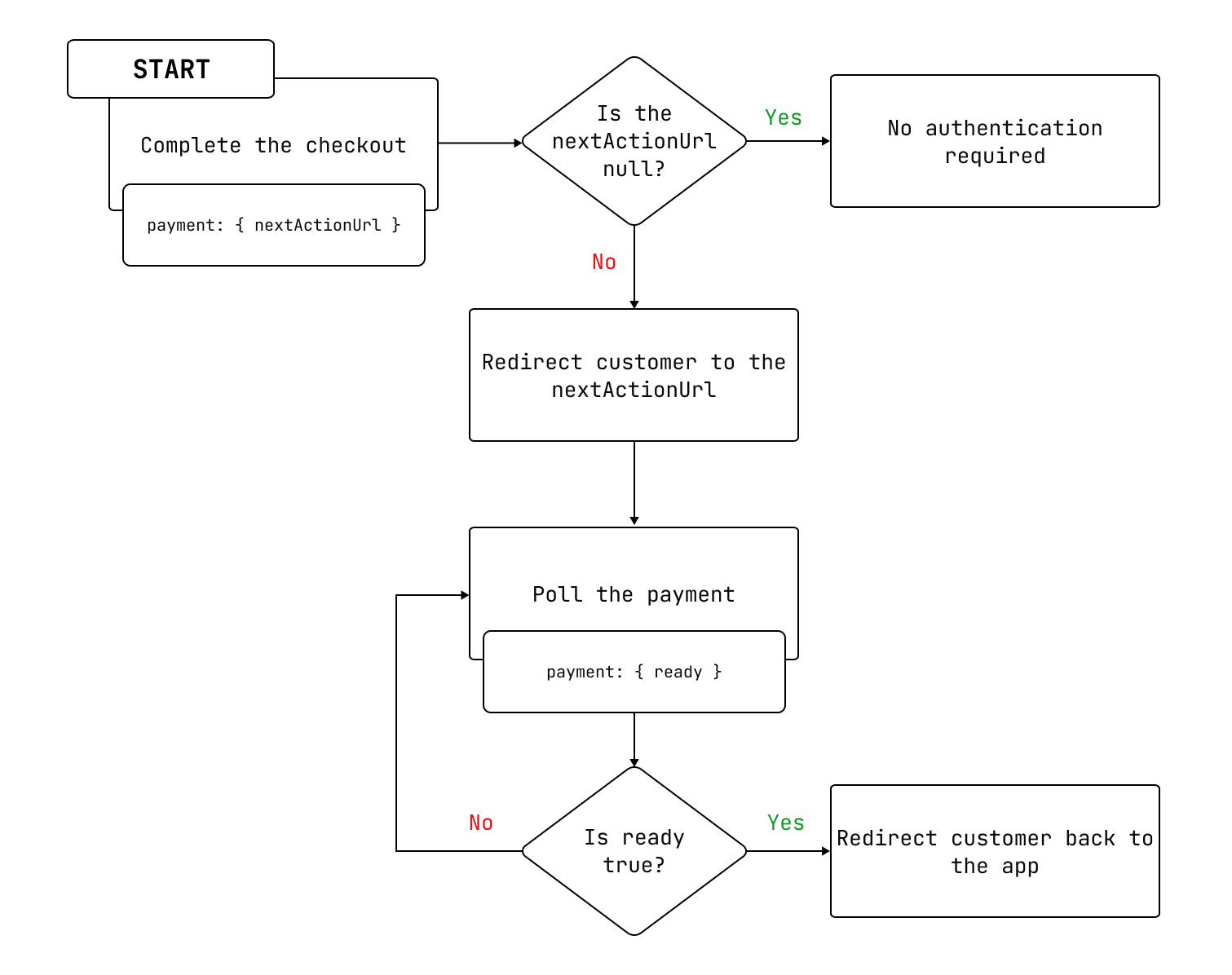
- The app completes the checkout and receives the
nextActionUrlattribute of thePaymentobject. If the
nextActionUrlisnull,然后客户不需要身份验证.If the
nextActionUrlisn'tnull, then the app redirects the customer to thenextActionUrlto complete authentication.The app polls the payment until
readyreturnstrue.The app redirects the customer back to the app.
Step 1: Complete the checkout
Anchor link to section titled "Step 1: Complete the checkout"You can pass the checkout ID, payment information, and session ID to thecheckoutCompleteWithCreditCardV2mutation to complete a checkout. For more information about creating and completing a checkout, refer toCreate a checkout with the Storefront API.
The following example shows a request and response for thecheckoutCompleteWithCreditCardV2mutation. Make note of thenextActionUrlin the response, which you'll use to poll the payment inthe next step.
Step 2: Redirect the customer
Anchor link to section titled "Step 2: Redirect the customer"ThenextActionUrlfield contains the URL where the customer needs to be redirected so they can complete the 3D Secure payment flow. Your app needs to send the customer to this URL so that they can authenticate their payment.
If thenextActionUrlisnull, then the customer doesn't need to authenticate their payment.
Step 3: Poll the payment
Anchor link to section titled "Step 3: Poll the payment"After you've sent your customer to thenextActionUrl, your app needs to poll the payment. ThePaymentobject includes thereadyfield, which is a Boolean that indicates whether the payment is still processing asynchronously. Theready场仍falseuntil authentication is completed with either a success or failure.
Your app should continue to poll the payment until thereadyfield returnstrue. Whenreadyistrue, the payment has reached a final state and nothing further will change. At this point, thecompletedAtfield on the checkout returns a time for a successful payment, ornullfor a payment that fails to complete. If the payment fails, then an error message is returned.
The following example shows how to poll a payment, which informs you if the payment has completed processing:
Step 4: Redirect the customer back to the app
Anchor link to section titled "Step 4: Redirect the customer back to the app"After the authentication is completed, the customer is redirected to a processing page. Your app is responsible for closing the page or webview after the authentication is completed and redirecting the customer back to your app.
Handling payments that don't require 3D Secure
Anchor link to section titled "Handling payments that don't require 3D Secure"For payments that don't require 3D Secure, there aren't any changes to the app or sales channel’s behavior:
nextActionUrlalways returnsnull. If you continue to poll the token, then thereadyfield eventually returnstruewhen the payment has completed its asynchronous processing.- If the payment succeeds, then the checkout's
completedAtfield is updated with the time of completion. - If the payment fails, then the checkout's
completedAt场仍null, anderrorMessagecontains a payment processing error message.
Handling API timeouts for 3D Secure
Anchor link to section titled "Handling API timeouts for 3D Secure"If thePaymentobject includes anextActionUrlfield, but doesn't handle the redirect within ten minutes, then Shopify marks the authentication as an error, and returns an error message.